
Calibration and gage management software Calibration management that holds up in the audit.
An auditor asks three things: which devices you use, whether each one was calibrated in time, and how you know. Calibration management software answers all three from one register – and reminds you before the answer becomes awkward.
Last updated: November 13, 2026 · Reviewed by irot
- Free for up to 20 devices
- No payment details
- Interface in English and German
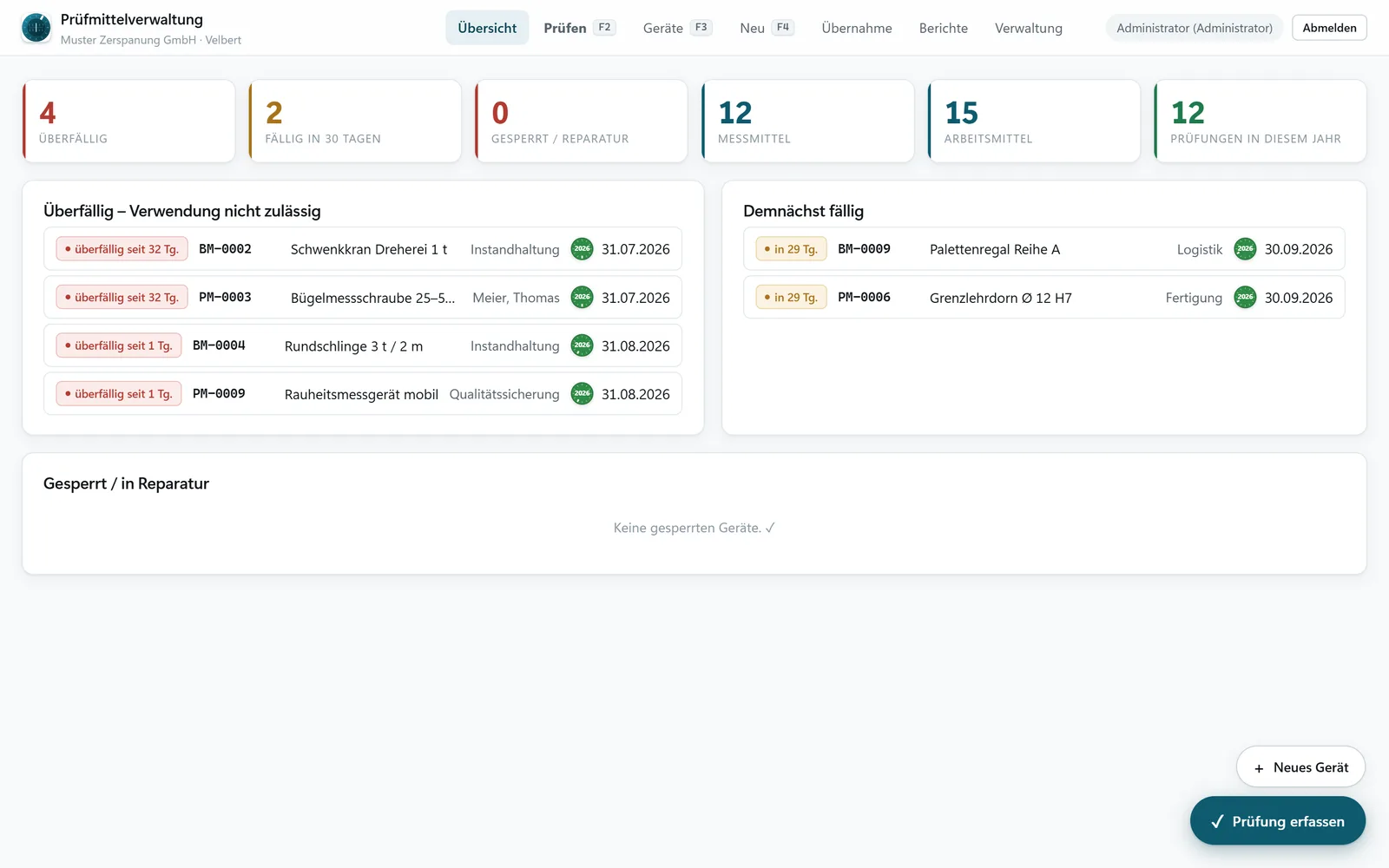
Depending on industry and country it is called calibration management, gage management or gage calibration software, calibration tracking or test equipment management – the job is the same: know every measuring device, keep it calibrated in time, and prove it.
What the standards ask for
ISO 9001 (clause 7.1.5) requires measuring equipment used to verify product conformity to be calibrated or verified at specified intervals against standards traceable to international or national standards, to be identified so its status can be seen, and to be protected against adjustments that would invalidate the result. If a device is found out of tolerance, you have to assess what that means for earlier results. IATF 16949 adds, among other things, a record of every gauge in the control plan and statistical studies of measurement systems (clause 7.1.5.1.1).
This is our summary in our own words, not the wording of the standards; the standards themselves are sold by ISO and IATF.
Six things the software has to do
- One register. Every device with ID, serial number, manufacturer, model, range, tolerance, location, owner and status. Example data must never count as your equipment.
- Intervals and due dates. An interval per device in months or weeks and a next due date that is calculated, not typed.
- Reminders that reach someone. Before the due date, to the person responsible, and a list of what is overdue. Ideally an overdue device can be blocked, not just coloured red.
- Records that cannot be changed afterwards. Each calibration with date, result, certificate, who released it. A correction cancels and re-records; the original stays visible.
- Traceability. Which reference standard or lab a calibration relied on – and, the other way round, which devices are affected when a reference standard turns out to be out of tolerance.
- Evidence on demand. Register, due-date list and history as PDF, Excel or CSV, and an audit folder that shows nothing was edited after export.
How Kalibrat covers them
All six are in the free Basis plan, apart from the deeper metrology and audit functions that are modules. In Kalibrat each device carries its history; a calibration is recorded with its certificate, the next due date follows from the interval, and overdue devices can be blocked automatically (a setting). Labels with QR codes show the status on the device itself. The audit folder is a ZIP with a SHA-256 checksum list – you can check it in the browser (page in German).
Spreadsheet or software?
A spreadsheet works for a handful of devices and one person who looks after it. It stops working when several people edit it, when nobody gets a reminder, and when an auditor asks who changed a date last March. The step up does not have to be a project: Kalibrat imports your existing list, so you start where you are. More on this in calibration tracking in Excel.
A checklist for choosing
- Is the price published, or only “on request”?
- Can you start with your own data before you sign anything?
- Can an overdue device be blocked, or only highlighted?
- Can a recorded calibration be overwritten?
- Can you export everything, at any time, without asking?
- Where are the servers, and who processes the data?
Pricing – published, not on request
Basis: €0, permanently. 20 own devices (example data does not count), 2 user accounts, the core functions – register, due dates, inspections, labels, reports, Excel import and export, the mobile app – and no payment details.
Unlimited: €7 per month plus €0.70 per employee with access (plus VAT where it applies). Devices, inventory and users unlimited, monthly cancellation to the end of the month; paying yearly you pay ten months. On invoice, in euros.
Modules, only if you need them – €3 to €9 per month each, all of them together €35:
- Metrology · €5
Measurement uncertainty, decision rules, uncertainty calculator, drift and interval analysis, gauge sets, traceability - Lab & calibration plan · €5
Calibration plan with costs, orders to the lab, lab ratings, certificates by e-mail - Audit & evidence · €8
Audit check, sampling with device file, audit folder, deviation approval, auditor access, four-eyes principle, monthly status - IATF 16949 · €9
Measurement system analysis type 1, 2 and 3 with Cg, Cgk, %GRR and ndc - Issue & workshop · €4
Check-out and return, reservations, repair orders with costs - Costs & budget · €3
What testing, calibration and repair cost – per device, department, lab - Microsoft 365 & interfaces · €9
Sign-in with the company account, storage in SharePoint, API, Teams - AI assistant · €5
Ask questions about your inventory in your own words; read calibration certificates and lists from a photo or PDF. Sends questions, device data or images to AI services outside the EU (privacy policy, section 5a, in German)
60 days money back on your first booking, on request and without giving a reason. Prices in euros; the binding terms are the German Nutzungsbedingungen.
Frequently asked questions
What is calibration management software?
Software that keeps a register of measuring and test equipment, calculates calibration due dates from intervals, reminds the responsible people, stores certificates and results, and produces evidence for audits.
Does ISO 9001 require calibration software?
No. ISO 9001 requires controlled, traceable and identified measuring equipment and retained evidence; how you keep it is your choice. Software makes the reminders, the history and the audit evidence much easier to keep complete.
Can Kalibrat handle measurement uncertainty and MSA?
Yes, as modules: Metrology covers measurement uncertainty and decision rules, the IATF 16949 module covers MSA type 1, 2 and 3 with Cg, Cgk, %GRR and ndc.
Can several sites or departments use it?
Yes. Devices belong to departments and locations, and access can be limited to the departments a user is responsible for.
See your own register in three minutes
Free for up to 20 devices, for as long as you like, with no payment details. Set up in three minutes – e-mail, your company, done. Your spreadsheet comes along.